Your Reliable Collaborative Word Processor
Word Online, developed by Microsoft, is a freemium web-based word processor that lets users create, edit, and share documents directly from a browser. Designed for individuals, students, and organizations, it provides a flexible platform for collaborative document editing accessible from any device with an internet connection. While it offers essential tools for free, some advanced capabilities and integrations are unlocked through a Microsoft 365 subscription.
Top Recommended Alternative

A Smarter Way to Collaborate in Real Time
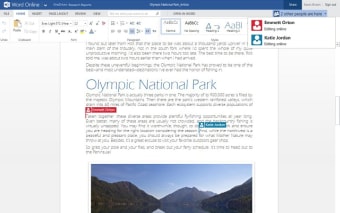
One of Word Online’s standout strengths is its real-time collaboration. Multiple users can edit a document simultaneously, with updates appearing instantly for everyone. Presence indicators show who is working in the file, while comments and replies help teams coordinate without leaving the document.Key collaborative tools include:
- Autosave, which continuously preserves every change
- Version history, enabling users to restore earlier document states
- Threaded comments, supporting in-context discussion and feedback
These tools make teamwork efficient and reliable, ensuring every contributor always works with the latest version.
Designed for Simplicity and Accessibility
Word Online features a streamlined version of Microsoft Word’s familiar ribbon interface, simplifying access to frequently used tools. Navigation remains intuitive with the navigation pane, search function, and basic formatting controls such as font choices, colors, alignment, and table creation.While it lacks macros, offline editing, and some advanced layout features available in the desktop edition, its core functionality meets most daily writing and formatting needs. Microsoft continues to improve the platform with enhanced accessibility options and refined commenting tools, ensuring inclusivity and ease of use.
Focused and Practical for Everyday Use
Overall, Word Online delivers a fast, straightforward experience for document creation and collaboration. It integrates seamlessly with OneDrive and SharePoint, keeping files secure and synchronized across devices. However, its dependence on an active internet connection, limited complex formatting, and performance drops with large or heavily styled documents make it less ideal for advanced publishing. For typical writing and team projects, though, it remains a reliable and convenient cloud-based solution.